
Getting started
How to make a Bulin 47 AI dance video from your photo
Quick answer
Your first video, from choosing a portrait to checking the face, dance and sound before saving it.
Before you begin
- Your photo guides the new main character; the video reference guides style, rhythm, camera and atmosphere.
- You can inspect a local photo preview before signing in; it is not a generated video preview.
- Check the full new clip in three passes: identity, movement, then sound.
To make a Bulin 47 AI dance video, use one authorized adult photo as the reference for a new main character. The supplied video inspires the style, rhythm, camera and atmosphere of a newly generated 15-second clip. Choose a useful portrait, decide your quality and budget, submit once, then review the finished video rather than expecting a copy of the reference recording.
Read the reference as a creative brief
Watch the supplied clip for its shoulder-led energy, close handheld camera and warm red street lighting. These cues help explain the kind of new video you are requesting. Your uploaded portrait supplies the main-character reference; the filmed people are not a cast you must identify or reproduce.
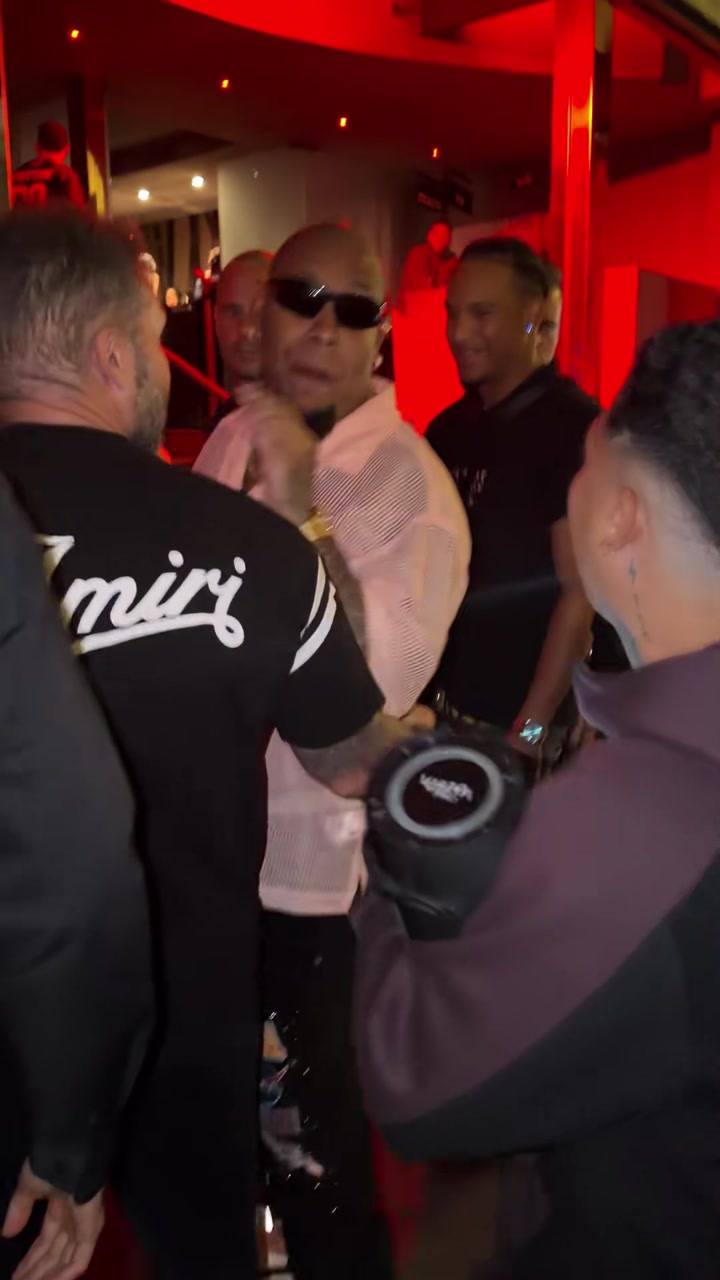
Source reference used to explain style and atmosphere. This is not a video generated by this site or a prediction of your result.
| Reference cue | What to notice | How to judge a new result |
|---|---|---|
| Rhythm | Short gestures and shoulder accents | Does the movement feel coherent and energetic? |
| Camera | A close, moving handheld viewpoint | Does the framing keep the new main character readable? |
| Atmosphere | Warm red light and a street gathering | Does the mood feel connected without needing an identical venue? |
| Main character | Appearance comes from your photograph | Are the intended facial features and visible styling recognizable? |
AI generates a new scene and motion. People, gestures, clothing, hands and timing can differ from the source. Look for a convincing new video with the right creative direction, rather than matching individual source frames.
Get these three things ready before you start
- One useful photo. Choose a sharp original with the eyes, mouth, hairline and shoulders visible. An upper-body picture gives more appearance information than a tiny face crop. Avoid sunglasses, heavy filters and a face half hidden in shadow.
- Permission for the intended use. Use an adult's photograph with their agreement and the right to use the image. Agree on whether the result is a private joke, a public post or something promotional.
- A plan for this attempt. The product requests a 15-second, 9:16 vertical video. The quality choices cost 20 credits for 480p, 45 for 720p and 80 for 1080p. Choose before submitting, rather than treating later generations as free upgrades.
JPG, PNG and WebP are accepted, up to 10 MB, with both width and height at least 256 pixels. These are file requirements, not a promise that a 256-pixel face will look detailed. If two photos seem equally suitable, use the photo comparison guide before spending credits.
Create your video: the actual sequence
1. Choose a photo and inspect the local preview
Open the generator and add the picture. Visitors can do this before signing in. Check that the selected image is the right person, upright and not cropped through the forehead or chin. Zoom into your original file if you cannot tell whether the eyes and mouth are sharp.
At this stage you are previewing the chosen photo in the current browser. You are not watching a free generated sample, and the image has not yet been uploaded for generation. You can replace it while deciding.
2. Confirm the template and quality
Review the Bulin 47 video reference for its style, rhythm and camera atmosphere. Confirm that this creative direction suits the new video you want, then choose the requested output quality.
Choose 480p if your immediate goal is to evaluate a new portrait at the lowest listed cost. Choose a higher requested resolution when you know why you need the larger output. A larger resolution cannot reveal an eye hidden by sunglasses or guarantee more accurate lip movement.
3. Sign in, confirm permission and submit once
Sign in when ready, recheck the photo after returning, confirm the authorization statement and review the charge and balance. Upload begins when you proceed with generation. Local selection belongs to this browser; do not assume another device will already have your photo selected.
If the page says upload or generation is unavailable, follow that message. A photo preview does not establish that a paid generation can run. After you submit, look for the task state before clicking again.
4. Follow the same task in My Creations
Open My Creations with the account used to submit. A processing task is not a finished video. If the page stops waiting or a status check fails, check the saved task before starting another: the first request may still be running.
When the task completes, play its result and use its download control. If it is completed but the browser player is black, try the downloaded file locally; do not pay for a new render just to diagnose playback.
Review the result in three separate passes
A good-looking opening frame can hide a problem later. Watch the entire clip, then replay specific moments.
| Review pass | What to look for | A useful action if it is wrong |
|---|---|---|
| Identity | Is the lead the intended person? Do the face and hair remain recognizable through head turns? | Compare with the original portrait; try a clearer photo only if that is the problem |
| Movement and scene | Watch shoulder accents, fingers, the hand near the head, speaker edges and onlookers | Note the moment of a distracting change before deciding on a new attempt |
| Sound | Unmute, check the actual recording and listen to the ending | Inspect the downloaded file; use the audio guide before regenerating |
These checks assess whether the new main character, movement and atmosphere work together. If a brief facial change is visible only during a fast turn, a new paid generation may still vary. If the face is unclear throughout, improving the input is more useful than assuming 1080p will repair it.
Keep the file you like before making revisions
Save an unchanged download before cropping, adding captions or changing audio in an editor. That preserves a starting point if an edit cuts the wrong section or adds two soundtracks on top of each other.
Each new generation uses its displayed credits and may differ from the previous one. For example, one 480p attempt followed by a new 720p attempt costs 65 credits in total, not 45. The quality and budget guide helps decide whether an additional attempt serves your actual use.
A task recorded as failed returns consumed credits. A slow page is not itself that failure state; check the record first. Cash refunds are handled separately under the site's policy.
Before you share, check sound and context
Listen to the file you actually downloaded. The current template requests audio from the model, but the soundtrack may vary or be absent. Original audio and exact lip-sync are not guaranteed; this product does not offer voice cloning. Adding a song later will not regenerate the performer's mouth. Use the music and sharing workflow if the sound or timing is not what you expected.
Watch the draft at the size your audience will see it. Keep captions away from the face, check that the ending is not abrupt and describe realistic footage as AI-generated. The site is independent, with no official artist partnership or endorsement. Do not present a generated performance as a real event or as someone endorsing a business.
Quick answers before your first attempt
Do I need to pose or dress like the original performer?
No. Use a photo that shows your own features clearly. The video inspires style and motion while your photo guides the new main character. Visible clothing can inform the result, but exact styling is not guaranteed.
Can I use a selfie, or do I need a full-body photo?
A clear, evenly lit selfie with the face and shoulders visible can be a useful starting point. A half-body portrait adds clothing and body context. Full-body framing is less useful when it makes the face tiny.
How long will it take?
There is no fixed completion-time promise. Use the task's recorded status rather than a stopwatch, and check the existing record before submitting again.
Ready to start? Choose your photo in the Bulin 47 generator, inspect the local preview and confirm the cost before uploading.