
The trend explained
Bulin 47 AI trend explained: original video, photo remakes and Dame Hombro
Quick answer
A clear starting point when the original freestyle, AI remakes and the song are being called the same thing.
Before you begin
- The filmed performance, a newly generated AI video and the released song are different media.
- Your photo guides a new main character; the video guides style, rhythm, camera and atmosphere.
- A new visual performance does not clone your voice, write a personal rap or guarantee a particular soundtrack.
The Bulin 47 AI trend inspires new videos with the energy of a recognizable street freestyle. Three things often get discussed together: footage of the source performance, AI-created videos using photographs as new-character references, and the released song Dame Hombro, credited to Bulin 47 and Kevin Wai. They are different media. Knowing which one you want helps you choose a creation or editing workflow without expecting a photo to change someone’s voice.
Three things that can look related without being the same file
| What you are looking at | What it is | What it does not establish |
|---|---|---|
| The source performance video | Filmed people, movements, camera and sound at a particular moment | That a newly generated video reproduces this recording |
| A new AI video | New scenes guided by a main-character photo and the video’s style, rhythm and atmosphere | That the depicted person actually took part in the source event |
| Dame Hombro, the released track | A music recording credited to Bulin 47 and Kevin Wai | That every freestyle repost uses that exact recording or starting point |
A short repost may also have a different audio edit, crop, playback speed or caption. Recognizing the red doorway or the song name is useful, but it does not prove that two clips use identical pictures and sound.
If your goal is to hear the released track, look for the title and credited artists. If your goal is to make a person appear in the dance, you need the photo-to-video workflow. If you already have a finished clip and only want different sound, that is an editing task after download.
What do the photo and video each contribute?
Your uploaded photo is the reference for a new main character: face, hair and visible clothing. The source video provides creative direction rather than a sequence of frames to modify.
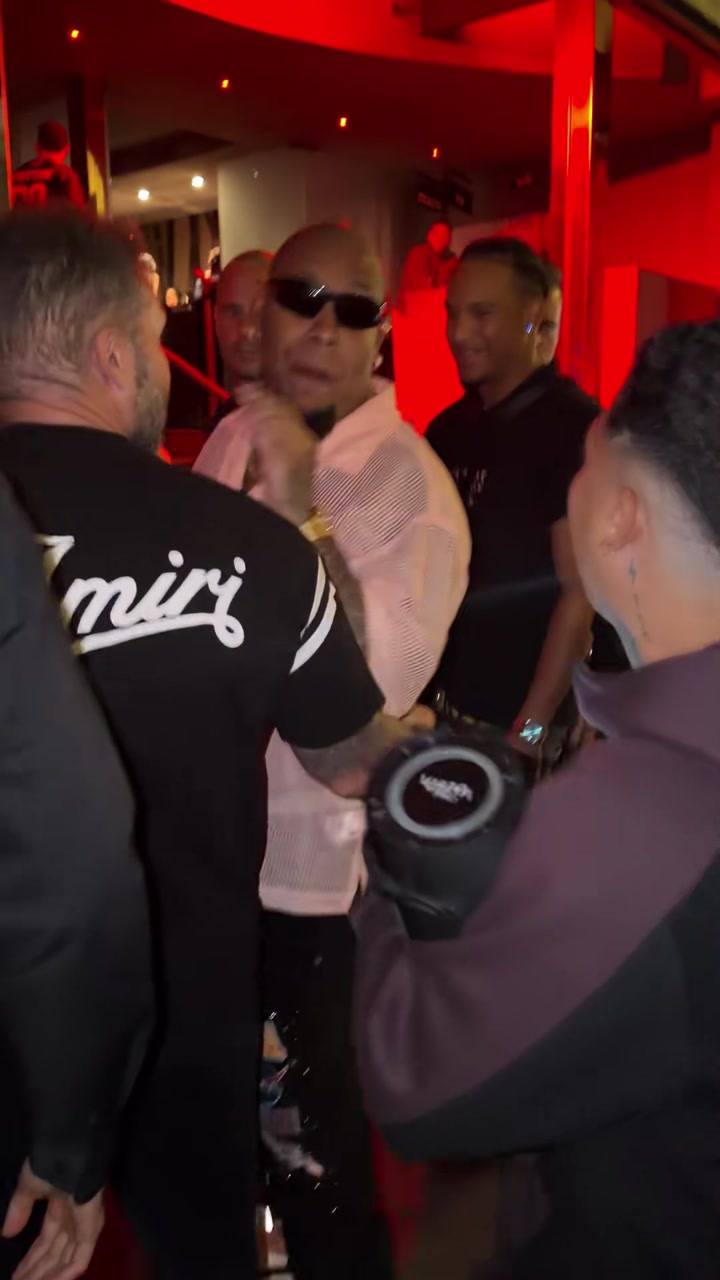
Source reference illustrating style and atmosphere. This is not a result generated by this site.
Read the clip on three levels. First, notice the shoulder accents and compact gestures that give it rhythm. Next, observe the close handheld framing and how the camera relates to the action. Finally, look at the warm red light and gathered street atmosphere. These cues can guide a new video without requiring the identical people, doorway or sequence of movements.
You do not need to dress like anyone in the reference or photograph yourself at that location. Choose a clear portrait and review whether the new character remains recognizable. Generated hands, scene details and timing still need checking; creative reference is not a promise of exact choreography.
Is a photo template just a slideshow with music?
No. Arranging still pictures and music on a timeline is different from generating moving frames in which a person performs. A still-image preview therefore tells you whether you selected the right photo, not whether the face will remain consistent while turning or moving.
Here, you select one adult portrait and the requested quality. The service creates a new 15-second vertical video in 9:16, with the photograph as a main-character reference and the supplied video as inspiration for style, rhythm, camera and atmosphere. Check the current product settings rather than assuming another tutorial’s lengths or audio features apply.
Do you need to download or upload the original freestyle?
Not for this site's template workflow. You bring one portrait; the site supplies the performance reference. There is no need to save a repost, trim a source video or upload a personal soundtrack as a preparation step.
That does not make every source you can find free to reuse. The reference is shown to explain the product, and its availability is not a blanket license for footage, music or commercial publication. Use an authorized adult photo and decide the intended audience before generating.
For a useful starting portrait, prioritize a visible face rather than matching the background. The photo selection guide explains how to choose between a selfie, a half-body picture and a distant full-body shot.
Will the new main character rap in my voice?
Using a portrait as a character reference does not record or clone your voice. It also does not create a new personal verse. Audio depends on the source permissions and the service's supported capabilities; the final file should be checked rather than assumed to be original, silent or ready for every use.
The released song and a live performance recording may differ in phrasing, lead-in and timing. Adding a track called Dame Hombro to a finished video does not prove it is the same recording, and it will not regenerate mouth shapes to match the words. If the sound begins correctly but falls away from the movement later, repeatedly shifting the start point may not solve it.
Use the sound and lip-sync workflow to inspect the actual file, identify a muted player, avoid two overlapping tracks and check both the beginning and ending of an edit.
Choose your next step by what you want to do
- “I want to make my first photo dance.” Follow the complete generation tutorial for preview, sign-in, submission and download.
- “I know the scene, but I want a better likeness.” Compare candidate portraits before another paid task; a larger resolution cannot reveal hidden facial features.
- “I only want to change music.” Keep the downloaded original and edit a separate copy. Another generation is not automatically the right solution.
- “I am trying to identify an original.” Separate the source performance, the credited song and an AI remake instead of assuming the most familiar repost is all three.
This site is independently operated and has no official artist affiliation or endorsement. Describe realistic remakes as AI-created rather than a real recording of the person in your photo. Ready to make your own authorized version? Open the Bulin 47 generator and start with the local photo preview.